Text
Text elements such as headings, paragraphs, and lists form the most basic components of your content.
Headings
Heading 1
Heading 2
This is an example of some paragraph text to show spacing.
Heading 3
Heading 4
<h1>Heading 1</h1>
<h2>Heading 2</h2>
<p>This is an example of some paragraph text to show spacing.</p>
<h3>Heading 3</h3>
<h4>Heading 4</h4>
Heading 1
Heading 2
This is an example of some paragraph text to show spacing.
Heading 3
Heading 4
Headings outline the organization of a document. Use headings to help structure your content so that it is clear and easy to understand.
Use Heading 1 to indicate a new page.
Be semantically-correct with your structure to make it easier for people that use screen readers to understand what you mean.
A page shouldn’t skip from a Heading 1 to a Heading 3 without a Heading 2 in-between. Always try to step down one level at a time.
You can also use Heading 1 to request links to files in the Table of Contents. See the Essential Tips section for more information.
Developer Notes
A heading has margin space above and below it, and automatically forces paragraph text or images to begin on a new line below it.
Paragraphs
Short passages are more comfortable for the reader.
Paragraphs give the writer a way to distinguish between shifts in subject matter or different points to be made. At the same time, they allow a reader to feel they are moving along a bit more fluidly, taking in one point at a time. Paragraphs provide a flow.
Long, rambling paragraphs ... can become boring or confusing...
<p>Short passages are more comfortable for the reader.</p>
<p>Paragraphs give the writer a way to distinguish between shifts in subject matter or different points to be made. At the same time, they allow a reader to feel they are moving along a bit more fluidly, taking in one point at a time. Paragraphs provide a flow.</p>
<p>Long, rambling paragraphs ... can become boring or confusing...</p>
<div class="reference">Adapted from <a href="https://www.quora.com/Why-do-newspapers-use-short-paragraphs">Quora.com</a>. Accessed September 2016.</div>
Short passages are more comfortable for the reader.
Paragraphs give the writer a way to distinguish between shifts in subject matter or different points to be made. At the same time, they allow a reader to feel they are moving along a bit more fluidly, taking in one point at a time. Paragraphs provide a flow.
Long, rambling paragraphs ... can become boring or confusing...
#reference
Adapted from Quora.com. Accessed September 2016.
/reference
Use the Normal style in Word to format your paragraph text:
- Click the Home tab
- In the Styles section, click the Normal style
Avoid underlining or colouring text for emphasis - use bold or italicized text instead.
Developer Notes
Open Sans is the font for paragraph text. This font is legible at different sizes. It is a modern update, very professional, and available in a variety of weights, providing great versatility.
Ordered Lists
- List Item 1
- List Item 2
- Sub-list Item 1
- Sub-list Item 2
- Sub-sub-list Item 1
- Sub-list Item 3
<ol>
<li>List Item 1</li>
<li>List Item 2
<ol>
<li>Sub-list Item 1</li>
<li>Sub-list Item 2
<ol>
<li>Sub-sub-list Item 1</li>
</ol>
</li>
<li>Sub-list Item 3</li>
</ol>
</li>
</ol>- List Item 1
- List Item 2
- Sub-list Item 1
- Sub-list Item 2
- Sub-sub-list Item 1
- Sub-list Item 3
Ordered lists are most-often used to indicate a sequence, rather than a collection of items like unordered lists. The default ordered list is Arabic numerals (1, 2, 3...), but any of the following types of enumeration can be requested:
- Arabic numerals (1, 2, 3...)
- lower-case alphabetic (a, b, c...)
- upper-case alphabetic (A, B, C...)
- lower-case Roman numerals (i, ii, iii...)
- upper-case Roman numerals (I, II, III...)
- alpha-numeric (1, a, 2...)
If you would like a list style that uses something other than the default enumeration, please leave us a comment in Word®.
Note
Although lists can have sub-lists that are any number of levels deep, research shows people have a difficult time corellating the structure when there are more than 3 levels.
Developer Notes
By default, ordered lists are numeric, then lower-alpha, then lower-roman numeral.
Use the following classes to override the default enumeration:
- lower-alpha
- upper-alpha
- lower-roman
- upper-roman
See Also
- Unordered lists
- Mozilla Developer Network <ol> reference
Unordered Lists
- List Item 1
- List Item 2
- Sub-list Item 1
- Sub-list Item 2
- Sub-sub-list Item 1
<ul>
<li>List Item 1</li>
<li>List Item 2
<ul>
<li>Sub-list Item 1</li>
<li>Sub-list Item 2
<ul>
<li>Sub-sub-list Item 1</li>
</ul>
</li>
</ul>
</li>
</ul>- List Item 1
- List Item 2
- Sub-list Item 1
- Sub-list Item 2
- Sub-sub-list Item 1
Unordered lists may have sub-lists (unordered or ordered) nested within.
Developer Notes
List defaults:
- Level 1
- solid, round discs
- Level 2
- hollow, round circles
- Level 3
- solid squares
Quotes
"One week you’ll be knee-deep in the complexities of the financial business..."(Hey Whipple Squeeze This! p. 16)
<blockquote>"One week you’ll be knee-deep in the complexities of the financial business..."
<div class="reference">(Hey Whipple Squeeze This! p. 16)</div>
</blockquote>
#quote
"One week you’ll be knee-deep in the complexities of the financial business..."
#reference
(Hey Whipple Squeeze This! p. 16)
/reference
/quote
Extended quotes or passages are called Blockquotes. Quotation marks are not required for blockquotes (as they are for inline or "pullquotes"). Blockquotes should be cited using the #reference and /reference tags.
Using References
#reference and /reference can be used anywhere (not just for quotes) to indicate a source, author or reference.
Developer Notes
Blockquotes are indented and have a different font and line spacing.
The blockquote font is Lora – a modern serif font optimized for screen use that also works well in print. It's a good pairing with Open.
Hyperlinks
BCIT offers a two-year, full-time Occupational Health and Safety Diploma program...
<p>BCIT offers a two-year, full-time <a href="https://www.bcit.ca/programs/occupational-health-and-safety-diploma-full-time-6850diplt/">Occupational Health and Safety Diploma program</a>...</p>BCIT offers a two-year, full-time Occupational Health and Safety Diploma program...
The text in the link is intended to describe the purpose of the link, and it's best to keep long URL's concealed from the reader.
Avoid embedding long links that start with http://some.link.com without accompanying text
Creating a Hyperlink in Word
For hyperlinks to web sites or resources, go to the site and copy the address first. Then, in Word:
- highlight the text you want to use as a link
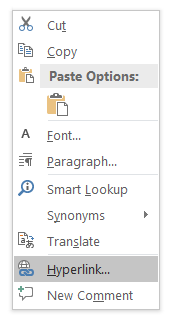
- right-click and choose Hyperlink
- paste the website into the Address field and click OK
For hyperlinks to files, it's best if everything is in the same folder as your Word document. Organize your files into a single folder. Then, in Word:
- highlight the text you want to use as a link
- right-click and choose Hyperlink
- paste the website into the Address field and click OK
Developer Notes
Links should always specify a target:
- Learning Hub internal links:
target=“_self”- External links:
target=“_blank” class=”external-link”
The link title attribute can be used to provide additional details for mouse users, but should not be relied on as the main source of information scent. See Using the Title Attribute to Help Users Predict Where They Are Going.
Math
a 2 + b 2 = c 2
<figure class="math">
<p>a <sup>2</sup> + b <sup>2</sup> = c <sup>2</sup>
</p>
<figcaption>Pythagorean theorem</figcaption>
</figure>
#math
a 2 + b 2 = c 2
Pythagorean theorem
/math
Adding class="left" will left-align the equation.
Figcaption is optional.
Developer Notes
MathML can be used once the page has been converted to HTML